We use cookies to understand how you use our site and improve your experience. Privacy Policy

All Build Guides
GamingUpdated 2026-08-062 min read

RGB Showcase Build Under $3,500

A head-turning build designed to look as good as it performs, with coordinated RGB lighting, a glass-panel case, and high-end components. About $3,422 at August 2026 catalogue prices.

Sarah KimPublished 2025-06-278 components$3,500 budgetCompatibility checked

Build this PC in one click

Load all 8 parts into the System Builder to check compatibility and total the build against your $3,500 target.

Key Takeaways

  • A showcase build is the one case where the enclosure is a performance part for the thing you actually bought — the look. The H9 Flow is $139.99 of this list and does more for the result than any $400 line item in it.
  • The RGB premium here is genuinely small, because the lighting-capable parts are good hardware first: the 360mm AIO out-cools most air towers and the H9 Flow's dual-chamber layout has real airflow. The only true lighting tax is the memory.
  • Buy the ecosystem, not the LED count. The Corsair cooler, fans and Vengeance RGB memory all sync in iCUE; the ASUS board's own zones need Armoury Crate. Two apps fighting over one build is what makes a light show look uncoordinated.
  • Every cable is on display in a dual-glass case, so budget for sleeved extensions before you budget for more lighting. It is the cheapest change that most improves how the build reads through the panel.
  • At August 2026 catalogue prices this list is about $3,422, not $2,000 — and $1,424.99 of that is the RTX 4070 Ti SUPER alone. The GPU is the line to revisit if the total matters; nothing else here is priced unreasonably.

August 2026 price check This build was specced to a $2,000 target. At August 2026 catalogue prices the same parts list comes to about $3,422. The RTX 4070 Ti SUPER is roughly $1,425 against the $799 assumed here, and the 32GB DDR5 kit adds about $290 more. The lighting and layout advice is unchanged; the graphics card is the line to revisit if the total matters more than the tier.

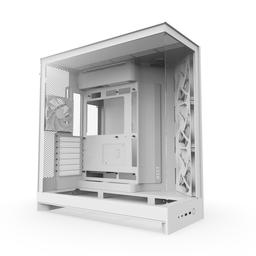
Some builds are meant to be seen. The NZXT H9 Flow's dual-glass-panel design puts every component on display, and this build fills that showcase with lighting from every angle. The Corsair iCUE H150i AIO pumps RGB through its radiator and pump head, while the G.Skill Vengeance RGB sticks illuminate the memory slots with per-key addressable LEDs.

But this isn't just a pretty face. The RTX 4070 Ti SUPER delivers 1440p gaming at ultra settings in every current title, and the Ryzen 7 7700X's 8 cores handle gaming, streaming, and background tasks simultaneously. The 2TB NVMe means you won't be uninstalling games to make room for new ones.

The beauty of a showcase build is that the aesthetic investment doubles as quality investment — the Corsair AIO keeps the CPU cooler than most air coolers, the case's airflow design is excellent despite the glass panels, and the 850W PSU leaves headroom for future GPU upgrades. You get the look without compromising on thermals or longevity.

Updated for mid-2026: The showcase formula still holds — dual-glass panels, coordinated iCUE lighting, and a strong 1440p core. The RTX 4070 Ti SUPER remains a great-looking 16GB card, but new buyers should cross-shop the RTX 5070 Ti (matches or beats it and adds DLSS 4 Multi Frame Generation) and AMD's RX 9070 XT for strong rasterization-per-dollar. The Ryzen 7 7700X is still plenty for gaming; the 7800X3D is a small upcharge if you want the fastest frames behind all that glass. DDR5 and NVMe pricing climbed sharply through 2026, so the original $2,000 target no longer covers this list — budget about $3,422, and see the price check at the top before you spec RGB fans and custom cables.
Our Verdict

A showcase build that is not just a light show: behind the dual glass panels sit eight Zen 4 cores, a 16GB RTX 4070 Ti SUPER and a 360mm AIO, which is a genuinely strong 1440p-ultra machine. The RGB tax here is real but small, because the iCUE cooler and H9 Flow also happen to be good hardware. Budget for white or custom cables, since every cable is on display.

Benchmark Performance

1440p ultra at 85-105 FPS in demanding AAA titles and 165-plus FPS in esports.

Average frames per second across benchmarked titles. 1440p ultra at 85-105 FPS in demanding AAA titles and 165-plus FPS in esports.
GameSettingsAverage FPS1% low FPS
Cyberpunk 20771440p Ultra9585
Fortnite1440p Epic170165
Baldur's Gate 31440p Ultra8575

Average FPS shown; hover a bar for 1% lows. Figures are editorial estimates unless the note above cites a source, and vary by settings, drivers, and specific SKUs.

8

Components

$3,500

Budget Tier

Pass

Compatibility

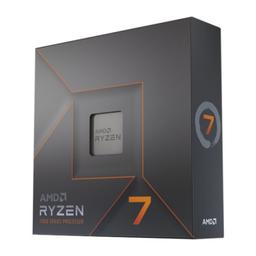
  • Eight Zen 4 cores are the right shape for a build that will be streamed as often as it is played — the 7800X3D wins pure gaming by roughly 10-15% in CPU-limited titles, but clocks lower in the encode and background work a showcase machine tends to be doing while it is being watched. At 105W it also stays inside what a 360mm AIO handles at low pump speed, which matters when the cooler is a display piece.

    • 8C/16T
    • 105W TDP
    • 5.4 GHz boost
    • AM5

    Alternative

    AMD Ryzen 7 7800X3D — Swap in the X3D if the build is purely for playing rather than for streaming — it is the fastest gaming chip at this price class and drops the thermal load further, at the cost of clock speed in encode and compile work.

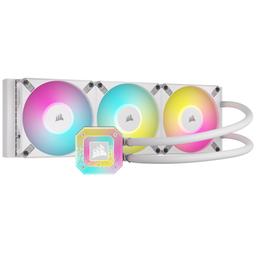
  • This is the part that justifies the whole RGB premise: the pump head and all three fans are addressable, and it still out-cools most air towers on a 105W chip, so nothing is being sacrificed for looks. Just as important, it anchors the build in iCUE — buying the cooler, fans and memory from one ecosystem is what avoids the two-app problem that makes lighting look uncoordinated.

    • 360mm AIO
    • 3x 120mm RGB fans
    • RGB pump head
    • iCUE controlled
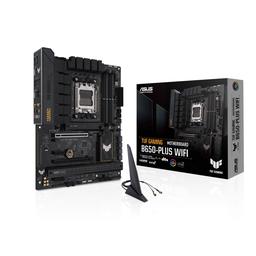
  • A solid, heatsinked B650 board with the two M.2 slots and Wi-Fi this build needs — but be honest about what it contributes here. Its 12+2 VRM has headroom a 105W 7700X will never ask for, and its own lighting is two small zones that live in Armoury Crate rather than iCUE. It is the most defensible place to spend less without changing anything you can see through the glass.

    • B650 chipset
    • 12+2 VRM
    • Wi-Fi 6
    • 2x M.2 PCIe 4.0
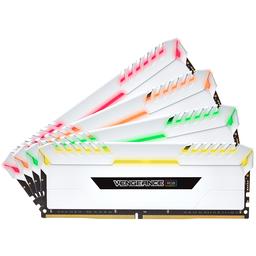
  • The one place in this list where paying for LEDs buys directly visible result rather than a glow bounced off a panel — the DIMM slots sit at eye level with nothing in front of them. It is also a genuine DDR5-6000 EXPO kit, which is the tested sweet spot for AM5, so the money is not purely decorative. Enable EXPO in the BIOS after the first boot or it runs well below its rated speed.

    • 32GB (2x16GB)
    • DDR5-6000
    • CL30 EXPO
    • Addressable RGB
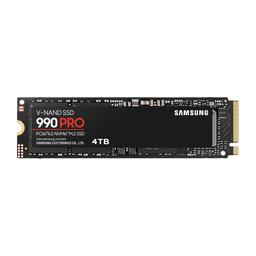
  • Invisible under the M.2 heatsink, which is exactly why it should be chosen on merit alone: 2TB is the capacity where you stop uninstalling games to make room, and the 990 Pro's sustained write performance holds up under the game captures a showcase build tends to accumulate. Take the 2TB over a 1TB drive plus a later second drive — the board's spare M.2 slot is better saved than spent.

    • 2TB
    • PCIe 4.0 x4
    • 7,450 MB/s read
    • M.2 2280
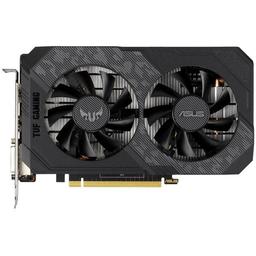
  • 16GB of VRAM and a triple-fan cooler that runs quiet make this a strong 1440p-ultra card and a clean horizontal line across the lower half of the case. But at $1,424.99 it is 48% of the build and the entire reason the $2,000 target is gone at August 2026 prices — cross-shop before you commit, because visually the tier below is a shroud and three fans in the same place.

    • 16GB GDDR6X
    • 285W TDP
    • Triple-fan
    • DLSS 3 Frame Gen

    Alternative

    NVIDIA GeForce RTX 5070 Ti — The card to actually price against this one in 2026: it matches or beats the 4070 Ti SUPER at 1440p, keeps 16GB, and adds DLSS 4 Multi Frame Generation. For pure rasterization-per-dollar, AMD's RX 9070 XT is the third quote worth getting.

  • The highest-leverage $139.99 in this list. Dual glass panels are the obvious part, but the dual-chamber layout is what actually makes the build look expensive — the power supply, drives and cable harness live in a separate compartment behind the tray, so the display side shows only components. Mesh top and bottom intakes mean the glass costs a couple of degrees, not ten.

    • Dual-chamber ATX
    • Dual tempered glass
    • 360mm top + side
    • Mesh top/bottom intake
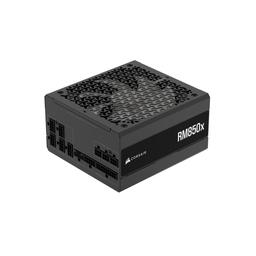
  • 850W in front of roughly 400W of rated component draw is deliberate overhead, not waste: it keeps the unit in its efficient, fan-quiet band during long sessions and leaves room for a much larger card later without a second purchase. Fully modular matters more than usual here — in a glass build every cable you do not install is one you never have to hide, and the stock black cables are the first thing worth replacing.

    • 850W
    • 80+ Gold
    • Fully modular
    • ATX 3.1 / 12V-2x6

Parts List

As an Amazon Associate, PlanMyPC earns from qualifying purchases made through links on this page. Read our affiliate disclosure

Where to Spend, Where to Save

Spend more on

The case, by a wide margin
On a showcase build the enclosure is the product. The H9 Flow's dual-chamber layout routes the power supply, drives and cable runs into a separate compartment behind the motherboard tray, which is the actual reason the front looks clean — not the lighting. At $139.99 it is the highest-leverage line in this list, and a cheaper single-chamber case would put the wiring harness in the middle of the display.
Lighting-capable memory, once
Memory sits directly behind the glass at eye level with nothing in front of it, so it is the one component where paying for LEDs buys visible result rather than a glow reflected off a panel. Vengeance RGB is also a legitimate DDR5-6000 CL30 EXPO kit, so the money is not purely decorative — buy the RGB version here and the plain version everywhere else.
Sleeved or custom cables
Every cable is visible through two glass panels, and the stock black bundle is the single most common reason an expensive showcase build photographs badly. A $40-60 extension set changes the look more than another lighting-capable component at any price, which is why it belongs in the original budget rather than the upgrade list.

Save on

The graphics card tier
At $1,424.99 the RTX 4070 Ti SUPER is 48% of this build and the single reason the $2,000 target is out of reach. Cross-shop the RTX 5070 Ti, which matches or beats it and adds DLSS 4 Multi Frame Generation, and the RX 9070 XT for rasterization-per-dollar. Visually the card is a shroud and a fan trio — the tier below looks identical through the glass.
Motherboard tier
$249 for a B650-PLUS is paying for VRM headroom a 105W 7700X will never ask for. Its lighting contribution is two small zones that need a second app to control. A cheaper B650 board with the same M.2 count and Wi-Fi loses nothing visible and nothing measurable in this configuration.
Memory capacity
The $399.99 32GB kit is the second-largest line here. 16GB of the same Vengeance RGB gives you identical lighting across the same two visible DIMM slots and is enough for 1440p gaming with a browser and Discord open. Capacity is the part of this line item you can halve without changing either the look or the frame rate.

Ready to build this list?

Every part above drops straight into the System Builder — compatibility checks, a running price total, and a one-click buy list.

The Bottom Line

Pros

  • 16GB RTX 4070 Ti SUPER handles 1440p ultra and dabbles at 4K
  • Single-app iCUE control over cooler, memory and fan lighting
  • Dual-glass H9 Flow shows the build off without wrecking airflow

Cons

  • Cable management is unforgiving when every cable is visible
  • The 7700X gives up a few frames to the 7800X3D at the same price class

Frequently Asked Questions

Is an RGB build worth the extra cost?

In this configuration the premium is modest, because the parts chosen for looks are also good hardware: the 360mm AIO cools better than most air towers and the H9 Flow has genuinely strong airflow. You pay mostly for the lighting-capable memory and fans.

Can I control all the lighting from one app?

Mostly. The Corsair AIO, fans and Vengeance RGB memory all live in iCUE; the ASUS motherboard's own zones use Armoury Crate. Keeping lighting-capable parts within one ecosystem is what avoids running two apps.

Would the 7800X3D be a better CPU here?

For pure gaming, yes, by roughly 10 to 15% in CPU-limited titles. The 7700X is the better pick if you also stream, encode or compile, since it clocks higher in non-gaming work.

Does the glass panel hurt thermals?

Less than you would expect on the H9 Flow, which pulls air through mesh top and bottom intakes rather than through the front panel. Expect a couple of degrees over a mesh-front case, not ten.

What should I upgrade first on a showcase build?

Cables, then fans. White or custom-sleeved extensions and a matched fan set change the look far more than another lighting-capable component does.

Related Guides

Parts8 components
Target$3,500