We use cookies to understand how you use our site and improve your experience. Privacy Policy

All Build Guides
GamingUpdated 2026-08-062 min read

Silent Gaming PC Build

A gaming PC engineered for near-silent operation without sacrificing frame rates, using premium quiet components throughout.

Alex ChenPublished 2025-06-248 components$2,500 budgetCompatibility checked

Build this PC in one click

Load all 8 parts into the System Builder to check compatibility and total the build against your $2,500 target.

Key Takeaways

  • Noise is a spec you buy at the component level, not a problem you fix afterwards. Every part below was chosen for what it does to the fan curve, and the result is about 30 dBA under a gaming load and under 20 dBA at the desktop.
  • The 7800X3D is the keystone: top-tier 1440p frames for 120W. Heat is the only thing fans exist to move, so a cool-running CPU is the cheapest decibel in the build.
  • Two of the three loudest potential noise sources switch off entirely when you are not gaming — the GPU's zero-RPM mode and the PSU's semi-fanless mode — which is why idle is near-silent rather than just quiet.
  • Air beats liquid at this wattage. The NH-D15 holds full boost below 1,000 RPM and has no pump to whine; an AIO only wins acoustically once you are shedding well past 200W.
  • At August 2026 catalogue prices this list is about $2,462, and the 32GB memory kit at $503 is most of the overrun. Memory makes no noise — halve it and every acoustic claim here still holds.

August 2026 price check This build was specced to a $1,700 target. At August 2026 catalogue prices the same parts list comes to about $2,462. Memory is the largest single move, from about $79 to roughly $503 for the 32GB kit. Every acoustic choice below is unaffected — the cooler, case and fan curve arguments hold at any memory price.

Loud fans are the one complaint every gamer has but few bother to fix. This build proves that silence and performance aren't mutually exclusive. Every component has been chosen with noise output as a primary selection criterion, from the Noctua NH-D15's legendary acoustics to the Fractal Design North's sound-dampened panels.

The Ryzen 7 7800X3D is ideal for a quiet build because its 120W TDP generates far less heat than Intel's competing K-series chips, while its 3D V-Cache delivers the best gaming performance available. Less heat means lower fan speeds, which means less noise. The RTX 4070 SUPER in its Gigabyte Gaming OC variant runs a conservative fan curve and shuts fans off entirely at idle.

The be quiet! Straight Power 12 operates in semi-fanless mode under moderate loads, and the Fractal Design North includes sound-dampened panels alongside excellent airflow design. Under typical gaming loads, this system hovers around 30 dBA — quieter than a whisper from three feet away.

Updated for mid-2026: Quiet-build logic still favors efficient, cool-running parts. The 7800X3D's low 120W envelope keeps fans slow and remains the silent-gaming sweet spot. If you're buying a GPU new today, the RTX 5070 and RX 9070 run efficiently and pair well with a semi-fanless PSU; most 50-series partner cards keep the zero-RPM-at-idle behavior the RTX 4070 SUPER offers here. The acoustic targets in this build are unchanged and still achievable in 2026.
Our Verdict

This is the build to copy if noise bothers you more than the last 10% of frame rate. The 7800X3D's 120W envelope, a Noctua NH-D15 and a semi-fanless be quiet! supply keep the system around 30 dBA under load while still holding high-refresh 1440p. Nothing here is exotic, and no part is quiet at the cost of performance.

Benchmark Performance

Around 30 dBA under gaming load while holding 1440p high-to-ultra above 90 FPS in AAA titles.

Average frames per second across benchmarked titles. Around 30 dBA under gaming load while holding 1440p high-to-ultra above 90 FPS in AAA titles.
GameSettingsAverage FPS1% low FPS
Cyberpunk 20771440p Ultra10090
Fortnite1440p Epic150144
Baldur's Gate 31440p Ultra9080

Average FPS shown; hover a bar for 1% lows. Figures are editorial estimates unless the note above cites a source, and vary by settings, drivers, and specific SKUs.

8

Components

$2,500

Budget Tier

Pass

Compatibility

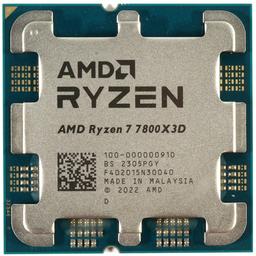
  • The entire acoustic budget of this build starts here. 3D V-Cache buys frames from cache hits rather than clock speed, so the 7800X3D delivers top-tier 1440p performance inside a 120W envelope where an equally fast Intel K-series chip pulls well past 200W. That gap is heat the cooler never has to move — the difference between fans at 800 RPM and fans at 1,400.

    • 8C/16T
    • 120W TDP
    • 96MB 3D V-Cache
    • AM5
  • Noctua NH-D15 — CPU Cooler
    CPU Cooler

    Noctua NH-D15

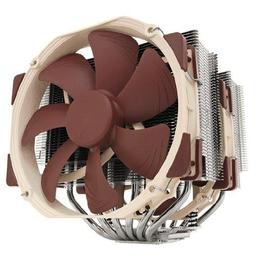
    A pump is a noise source that never stops, and at 120W there is nothing for a pump to do. Two 140mm fans across a dual-tower heatsink hold the 7800X3D at full boost well under 1,000 RPM, which is below the room. Liquid cooling only becomes the quieter answer once you are shedding past roughly 200W — buying it here would add a whine and remove nothing.

    • Dual-tower air
    • 2x 140mm fans
    • 24.6 dBA max
    • 165mm tall
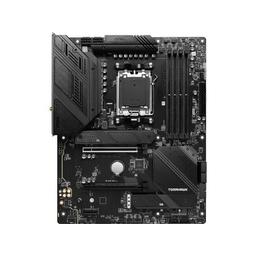
  • On a silent build the board is an acoustic component, because fan control is where the decibels are actually won. A heavily heatsinked 14+2+1 VRM never needs an active chipset fan of its own, and MSI's per-header PWM curves let you flatten the response so fans ramp on sustained heat rather than chasing every load spike.

    • B650 chipset
    • 14+2+1 VRM
    • Wi-Fi 6E
    • 2.5G LAN
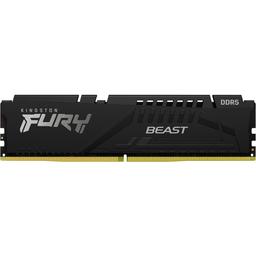
  • Memory is the one part here chosen for nothing acoustic — it makes no noise at any capacity — and at $503 it is now the largest line in the build. DDR5-5200 gives up a few percent to a 6000 EXPO kit in CPU-bound titles, which at 1440p on this GPU you will not see. If the total matters, this is the first line to cut, not the cooler.

    • 32GB (2x16GB)
    • DDR5-5200
    • Dual channel
    • 5W
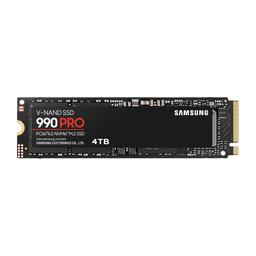
  • Silent by construction, but the reason to pick this drive specifically is thermal: efficient Gen4 controllers stay inside what the board's passive M.2 heatsink can handle, so no actively cooled drive heatsink ever enters the case. A hot NVMe that needs its own tiny high-RPM fan would undo the work every other part here is doing.

    • 2TB
    • PCIe 4.0 x4
    • 7,450 MB/s read
    • Passive M.2 cooling
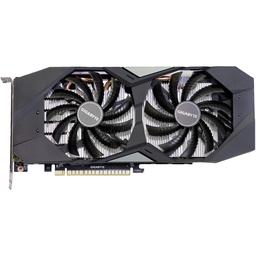
  • In almost any gaming PC the graphics card is the loudest thing in the case, which is why the acoustic money goes here rather than into a faster tier. A triple-fan cooler sitting on a 220W card runs nowhere near its fan ceiling under load, and the zero-RPM idle mode means the desktop is genuinely silent rather than merely quiet.

    • 12GB GDDR6X
    • 220W TDP
    • Triple-fan
    • 0 dB idle mode
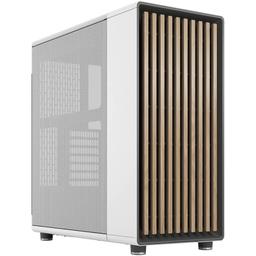
  • The rare quiet case that is not a sealed box. Dampening only pays off if air still gets in — a solid foam-lined front restricts intake and makes every fan behind it spin faster to compensate, which is how 'silent' cases end up louder. The North's slatted walnut front keeps the intake path open so the dampened side panels are a net win.

    • Mid-tower ATX
    • 2x 140mm included
    • Slatted wood front
    • 355mm GPU clearance
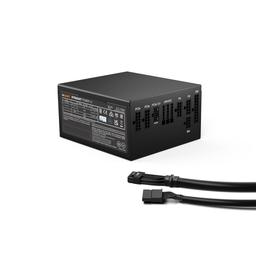
  • 850W in front of a system that peaks near 450W is deliberate oversizing, not waste. Semi-fanless mode is a load threshold rather than a switch — buy a 'right-sized' 650W unit and the fan starts during gaming; buy this and it stays stopped through the loads you actually run. Platinum efficiency also means less waste heat for the case fans to carry out.

    • 850W
    • 80+ Platinum
    • Fully modular
    • Zero-RPM 135mm fan

Parts List

As an Amazon Associate, PlanMyPC earns from qualifying purchases made through links on this page. Read our affiliate disclosure

Where to Spend, Where to Save

Spend more on

The graphics card's cooler, not its tier
The GPU is the loudest thing in a gaming case by a wide margin, so a large triple-fan cooler loafing over a 220W card is quieter than a faster card working hard. Once noise is the goal, cooler-per-watt is the spec that matters and frames-per-dollar is the one you trade away.
Power supply headroom
Semi-fanless operation is a load threshold, not a feature you toggle. 850W in front of a ~450W system keeps the supply inside its fan-stop band through real gaming sessions; a correctly sized 650W unit would spin up exactly when you want silence.
A case that dampens without choking
Sound-deadening foam behind a solid front panel is a trap — the restricted intake makes every other fan spin faster to compensate and the build ends up louder. Paying for a case that keeps the intake path open is what makes the dampened panels worth anything.

Save on

Memory capacity and speed
$503 for 32GB is the single largest line here and contributes exactly zero decibels. A 16GB kit runs the identical fan curve, and DDR5-5200 versus a 6000 EXPO kit is worth a few percent in CPU-bound titles you will not encounter at 1440p on this GPU.
Liquid cooling
Nothing about a 120W CPU justifies an AIO. You would pay more to add a pump — a noise source that runs constantly and cannot be curve-tuned away — in exchange for cooling headroom this build never uses.
Aftermarket case fans
The North's two bundled 140mm fans are already quiet at the RPMs this system asks of them. Noctua NF-A14s buy a couple of decibels for around $70, which makes them the last upgrade worth doing here, not the first.

Ready to build this list?

Every part above drops straight into the System Builder — compatibility checks, a running price total, and a one-click buy list.

The Bottom Line

Pros

  • Near-silent: about 30 dBA gaming, under 20 dBA at idle
  • 7800X3D delivers top-tier 1440p frames at only 120W
  • Zero-RPM GPU and PSU fan modes mean silence at the desktop

Cons

  • Air cooling limits headroom if you later fit a 300W-plus GPU
  • Costs more than an equally fast build that is allowed to be loud

Frequently Asked Questions

How quiet is this build in practice?

Roughly 28 to 32 dBA under a gaming load and under 20 dBA at idle, which is quieter than most room ambience from three feet away. The GPU and power supply both stop their fans entirely when the system is idle.

Is air cooling really quieter than an AIO?

For a 120W CPU, yes. The Noctua NH-D15 has no pump to whine and moves enough air at low RPM to hold the 7800X3D at full boost. Liquid coolers only win once you are dissipating well past 200W.

Should I buy a 50-series GPU instead?

If you are buying new today, the RTX 5070 is a sensible swap and most partner cards keep the zero-RPM idle behaviour this build depends on. Check the specific model's fan-stop and noise-normalised reviews before ordering.

Do I need to replace the case fans?

No, the Fractal Design North ships with two 140mm fans that are quiet at low RPM. Swapping to Noctua NF-A14 units buys a couple of decibels at the same airflow if you want to chase the last of the noise.

Will undervolting make it quieter?

Yes, and it is the cheapest improvement available. A modest GPU undervolt typically cuts 30 to 50W of heat with no measurable frame-rate loss, which lets both the GPU and case fans spin slower.

Related Guides

Parts8 components
Target$2,500