We use cookies to understand how you use our site and improve your experience. Privacy Policy

All Build Guides
GamingUpdated 2026-08-062 min read

Best White-Themed Gaming Build

An all-white aesthetic gaming PC that pairs clean visuals with strong 1440p performance — every visible component is white or silver.

Sarah KimPublished 2025-07-118 components$2,800 budgetCompatibility checked

Build this PC in one click

Load all 8 parts into the System Builder to check compatibility and total the build against your $2,800 target.

Key Takeaways

  • The theme is a sourcing problem, not a performance one. Underneath the white this is a 7800X3D plus RTX 4070 SUPER, the strongest 1440p pairing at this budget, and nothing in the aesthetic costs you frames.
  • Two lines have to be ordered as the white SKU, not just the model name. Gigabyte's white 4070 SUPER is the AERO OC, not the Gaming OC quoted here, and Vengeance RGB ships in both finishes under the same name — order the wrong one and the theme is finished before you start.
  • White cable extensions are the highest-return purchase in a build like this and they are not in the parts list. Every cable crosses two glass panels; $40-60 of white extensions changes the look more than any component swap at any price.
  • At August 2026 catalogue prices this list is about $2,712 against the $1,800 target, and two lines account for most of the gap: the 32GB memory kit at $399.99 and a third-party Kraken X63 offer near $249, well above what that cooler actually sold for. Substitute a current white 280mm AIO and shop the memory and the target is close again.
  • White hides nothing on the inside. Run positive pressure — more intake than exhaust — and keep the front filter clean, or the grey dust line shows up in every photo of the interior.

August 2026 price check This build was specced to an $1,800 target. At August 2026 catalogue prices the same parts list comes to about $2,712. Memory adds about $290 and the RTX 4070 SUPER about $240. One line is worth checking before you order: our catalogue's only listing for the Kraken X63 is a third-party offer near $249, well above what this cooler sold for, so a current 280mm AIO in the same finish is the better buy.

White PC builds have exploded in popularity, and for good reason — they look stunning. But building an all-white system requires careful part selection because not every component comes in a white variant. Every product in this list is available in white or white-adjacent colorways, so you won't end up with a black GPU breaking the aesthetic.

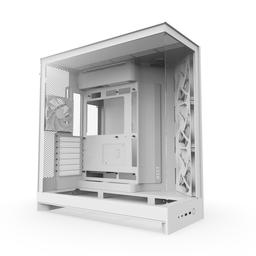
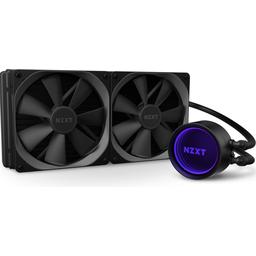
The NZXT H9 Flow in white is the centerpiece. Its dual-glass-panel design showcases the interior from the front and side, turning your build into a piece of functional art. The NZXT Kraken X63 in white adds a clean AIO with a minimalist pump head, and the G.Skill Vengeance RGB sticks complement the white theme with customizable lighting.

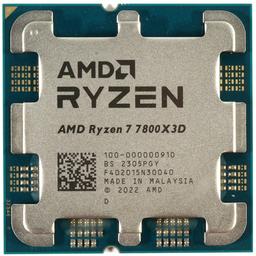
Performance matches the aesthetics — the Ryzen 7 7800X3D is the best gaming CPU available, and the RTX 4070 SUPER (available in white from Gigabyte and other manufacturers) pushes 1440p gaming at high-to-ultra settings in every current title. Cable management is key in a white build since every cable is visible through the glass panels, so plan for white cable extensions or custom cables.

Updated for mid-2026: The 7800X3D is still the gaming CPU to beat, so the performance core of this white build is unchanged. White-GPU availability has actually improved — Gigabyte, ASUS, and MSI now ship white RTX 5070 and 5070 Ti models, so a 50-series step-up no longer breaks the aesthetic, and AMD's RX 9070/9070 XT also has white partner cards. DDR5 and NVMe pricing has eased, freeing budget for white cable extensions and fans to finish the look. The $1,800 target still holds in 2026.
Our Verdict

An all-white build only works if every visible part actually ships in white, and that is the real work this parts list does for you. Underneath the theme it is a 7800X3D plus RTX 4070 SUPER machine, which is the strongest 1440p pairing at this budget. White 50-series partner cards now exist, so a GPU step-up no longer breaks the look.

Benchmark Performance

1440p high-to-ultra at 90-110 FPS in AAA titles and 144-plus FPS in esports.

Average frames per second across benchmarked titles. 1440p high-to-ultra at 90-110 FPS in AAA titles and 144-plus FPS in esports.
GameSettingsAverage FPS1% low FPS
Cyberpunk 20771440p Ultra10090
Fortnite1440p Epic150144
Baldur's Gate 31440p Ultra9080

Average FPS shown; hover a bar for 1% lows. Figures are editorial estimates unless the note above cites a source, and vary by settings, drivers, and specific SKUs.

8

Components

$2,800

Budget Tier

Pass

Compatibility

  • The 96MB of stacked L3 cache is why this chip still beats newer, higher-clocked parts in exactly the 1440p games this build targets, and it does it at 120W. That second number matters twice in a themed build: a cool chip lets the visible fans run slow, and it means you do not have to spend the cooler budget chasing a thermal problem instead of a finish. Nothing about the aesthetic costs performance here — this is the same CPU the unthemed builds at this budget use.

    • 8C/16T
    • 96MB 3D V-Cache
    • 120W TDP
    • AM5
  • NZXT Kraken X63 — CPU Cooler
    CPU Cooler

    NZXT Kraken X63

    Chosen for the white colorway and the clean, unbranded infinity-mirror pump head, which is the part of a cooler you actually see through a side panel. Treat the price on this line with suspicion: our catalogue's only listing is a third-party offer near $249, well above what the X63 sold for at list, and it is now a previous-generation model. A 120W X3D does not need a 280mm AIO to stay quiet, so buy the current white 280mm equivalent at its real price — or a white air tower — and put the difference into cables.

    • 280mm AIO
    • 2x 140mm fans
    • White colorway
    • Infinity-mirror pump

    Alternative

    NZXT Kraken 280 (2024), white — The direct current-generation replacement in the same size and finish: same 280mm radiator, same white shroud, sold at list price rather than at a marketplace markup.

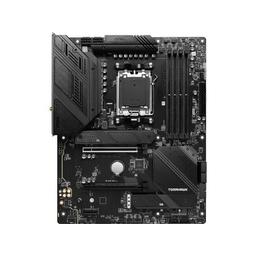
  • The honest note in a themed build: this board is black with silver heatsinks, and that is fine, because almost none of it is visible once the graphics card, the AIO tubing and the top shroud are in. Buy it for the 14+2+1 VRM, Wi-Fi 6E and two PCIe 4.0 M.2 slots, not for the finish. White-PCB boards exist and charge a real premium for surface area the build hides anyway.

    • B650 chipset
    • 14+2+1 VRM
    • Wi-Fi 6E
    • 2x M.2 PCIe 4.0
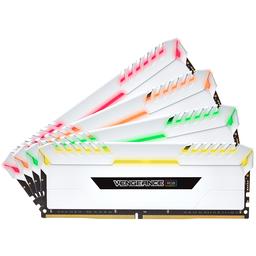
  • The DIMM slots sit at eye level with nothing in front of them, so this is one of only two places in the build where lighting is seen directly rather than bounced off a panel. Vengeance RGB ships with a white heatspreader as well as black under the same model name, so order the white SKU explicitly. DDR5-6000 CL30 is the tested sweet spot for AM5 — enable EXPO after the first boot or it runs far below its rating — but at $399.99 this is the second-largest line here, and 16GB of the identical kit lights the same slots.

    • 32GB (2x16GB)
    • DDR5-6000
    • CL30 EXPO
    • White SKU available
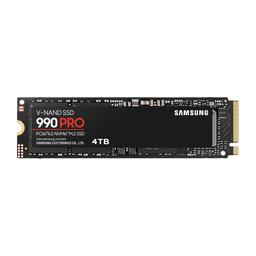
  • The one part in this list where the theme is irrelevant — it disappears under the motherboard's M.2 heatsink the moment it is installed, so buy it purely on merit. 2TB is the right capacity precisely because this is a glass-panel build: modern installs run 100-150GB each, and the alternative to buying enough storage now is pulling the side panel and re-routing cables later. Skip the heatsinked variant, since the board's own M.2 cover does that job.

    • 2TB
    • NVMe Gen4
    • 7,000 MB/s read
    • M.2 2280
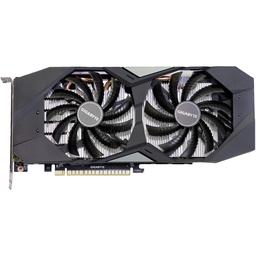
  • The performance pick is right — 12GB and DLSS 3 carry 1440p high-to-ultra in everything current — but the colorway is not. Gigabyte's white 4070 SUPER is the AERO OC; the Gaming OC listed here is black. The card is the largest visible surface behind the glass, so this is the one line where the white variant is worth a premium rather than a substitution. At $839 it is a third of the build, and white RTX 5070, 5070 Ti and RX 9070 XT partner cards now exist if you would rather step up than sidestep.

    • 12GB GDDR6X
    • 2565 MHz boost
    • 300mm long
    • DLSS 3 + Frame Gen

    Alternative

    Gigabyte AERO OC GeForce RTX 4070 SUPER — Identical GPU and clocks in Gigabyte's white-and-silver AERO shroud — the same card, in the finish this build actually calls for.

  • The centrepiece, and the highest-leverage $139.99 in the list. Two glass panels put the interior on display from the front and the side, but what makes it read clean is the dual-chamber layout: the power supply, the drives and every cable run live in a separate compartment behind the motherboard tray. In a white build that structural cable management is worth more than any lighting you can add on top, because visible white cables advertise every routing mistake. Only two fans are included against six mounting points, so budget for three or four more in white — that is a real cost the case price hides, and it is also how you get the positive pressure a white interior needs.

    • Dual-chamber
    • 2x tempered glass
    • 2 fans included / 6 max
    • 400mm max GPU
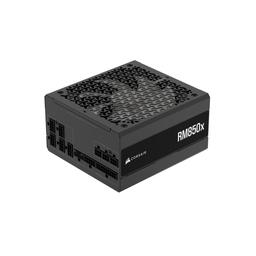
  • 850W is deliberate overkill against a roughly 340W CPU-and-GPU load, and that is the point: it keeps the fan stopped during normal gaming, which is what you want in a build whose selling point is how it looks and sounds sitting on a desk. It ships in white as well as black and is ATX 3.1 with a native 12V-2x6 connector, so a 50-series upgrade later needs no adapter. Note that the bundled cables are black even on the white unit — this is exactly the line white extensions are for.

    • 850W
    • 80+ Gold
    • Fully modular
    • ATX 3.1 / 12V-2x6

Parts List

As an Amazon Associate, PlanMyPC earns from qualifying purchases made through links on this page. Read our affiliate disclosure

Where to Spend, Where to Save

Spend more on

The case, because here it is the theme
The H9 Flow is $139.99 of this list and does more for the result than any other line. Two glass panels put the build on display from the front and the side, but the reason it reads clean is the dual-chamber layout, which moves the power supply, drives and every cable run into a compartment behind the motherboard tray. That is structural cable management you cannot buy back later with fans or lighting, and in a white build visible cabling is the single most common thing that ruins the look.
The white variant of the graphics card, even at a premium
The card is the largest visible surface behind the glass. A black shroud in the middle of an all-white interior is not a compromise on the theme, it is a different build — which is why this is the one line worth paying a premium to get in the right finish rather than substituting down. Gigabyte's white 4070 SUPER is the AERO OC; white RTX 5070, 5070 Ti and RX 9070 XT partner cards also exist if you would rather step up than sidestep.
White cable extensions, inside the original budget
They are not in this parts list and they should be. Every 24-pin, EPS and PCIe run crosses two panes of glass, and the stock cables are black even on white power supplies. A $40-60 extension set is the cheapest change that most improves how the build photographs, so it belongs in the build budget rather than on the upgrade list where it usually ends up.

Save on

The cooler line as quoted
$249 is a third-party marketplace offer for a previous-generation Kraken X63, far above what it sold for at list. A 120W 7800X3D is not a thermally demanding chip and does not need a 280mm AIO to stay quiet, so this is the easiest $80-100 to take out of the build: buy the current white 280mm equivalent at its real price, or a white air tower, and put the difference into cables and fans.
Memory capacity, not memory quality
At $399.99 the 32GB kit is the second-largest line here. A 16GB kit of the same white Vengeance RGB lights the same two visible DIMM slots identically and is enough for 1440p gaming with a browser and Discord open. Capacity is the half of this line item you can drop without changing either the look or the frame rate — keep the RGB and the DDR5-6000 CL30 rating.
Motherboard finish
White-PCB boards carry a real premium for surface area you cannot see: once the graphics card, AIO tubing and top shroud are installed, almost none of the board is visible. Buy this line on VRM, Wi-Fi and M.2 count — the black-and-silver MAG B650 TOMAHAWK is fine — and let the case and the GPU carry the theme.

Ready to build this list?

Every part above drops straight into the System Builder — compatibility checks, a running price total, and a one-click buy list.

The Bottom Line

Pros

  • Every visible component is available in white or silver
  • 7800X3D is still the best gaming CPU at this price
  • Dual-glass H9 Flow suits the theme without hurting airflow

Cons

  • White parts often carry a small price premium and thinner stock
  • Visible white cables show every routing mistake

Frequently Asked Questions

Are white PC parts more expensive?

Usually by a small margin, and stock is thinner than for black variants. The bigger cost is completeness: to keep the theme you have to buy white versions of parts, such as cables and fans, that you might otherwise take whatever came in the box.

Can I get a white graphics card?

Yes. Gigabyte, ASUS and MSI all ship white RTX 5070 and 5070 Ti models, and AMD's RX 9070 and 9070 XT have white partner cards, so a modern GPU no longer forces a black card into a white build.

Do white cases get dirty faster?

They show dust more readily than black, especially on the exterior. A front dust filter and a positive-pressure fan setup, more intake than exhaust, is what keeps the interior looking clean.

What is the cheapest way to complete a white theme?

White cable extensions first, then white case fans. Together they cost far less than any component swap and change the look more than either.

Should I use the 9800X3D instead?

Only if you want the fastest possible frames. The 9800X3D adds roughly 8 to 12% in CPU-limited games for a real premium; at this budget the 7800X3D leaves that money for the aesthetic parts.

Related Guides

Parts8 components
Target$2,800