Buy a dual-tower air cooler for a gaming CPU such as the Ryzen 7 9800X3D, and a 360mm AIO liquid cooler for a chip that runs near 250W at full load, such as an Intel Core Ultra 9 285K or Core i9-14900K. Air has no pump to fail; liquid pulls ahead as the heat load rises.
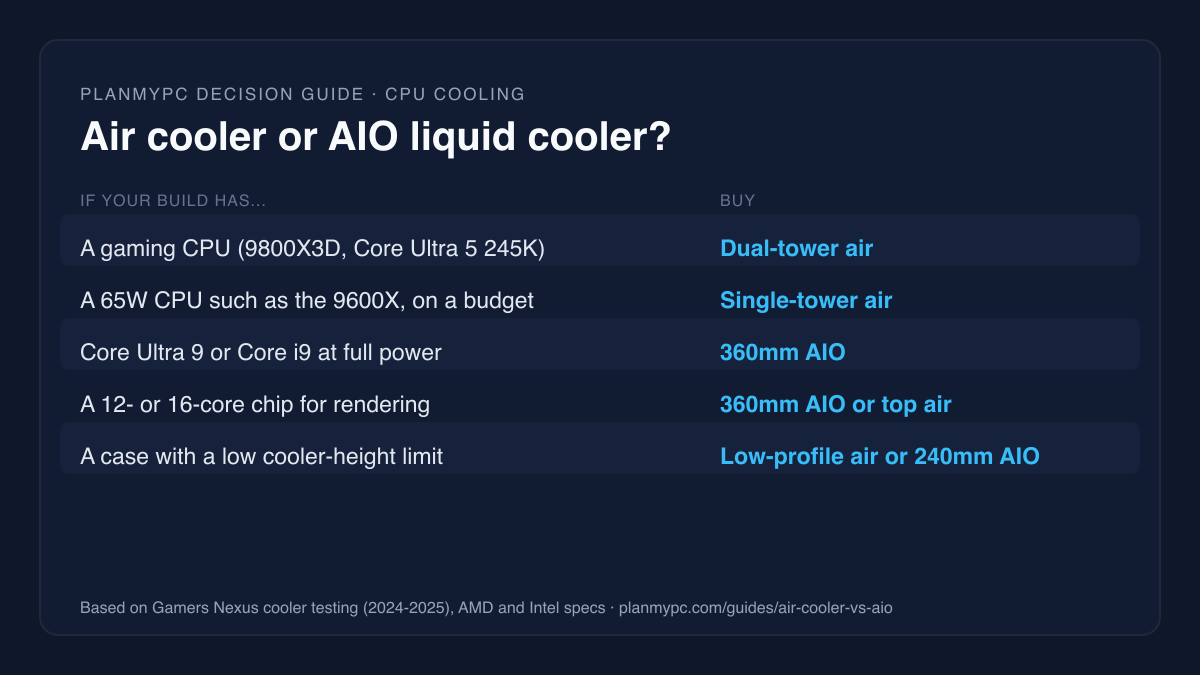
Air or AIO: the short answer
| Your build | Cooler type | Next step |
|---|---|---|
| A gaming CPU such as the Ryzen 7 9800X3D or Core Ultra 5 245K | Dual-tower air | Best CPU coolers |
| A 65W CPU such as the Ryzen 5 9600X, on a budget | Single-tower air | Browse coolers |
| Core Ultra 9 or Core i9 K-series, run at full power | 360mm AIO | Check your build |
| A 12- or 16-core chip for rendering or compiling | 360mm AIO or the strongest air cooler | Workstation builds |
| A small case with a low cooler-height limit | Low-profile air or a 240mm AIO | Compact builds |
| The quietest PC at full load | A large air cooler or 360mm AIO with slow fans | Silent PC build |
Air vs AIO side by side
| Dual-tower air | 360mm AIO | |
|---|---|---|
| Near 250W at equal noise (Gamers Nexus) | NH-D15 G2: 9.7°C warmer | Liquid Freezer III 360: 9.7°C cooler |
| Budget vs best air cooler | 1.2°C to 4.4°C apart | Not applicable |
| Moving parts | Fans | Pump and fans |
| If it fails | Replace a fan | CPU throttles until the unit is replaced |
| What limits fit | Cooler height, memory clearance | Radiator mount, GPU length with a front radiator |
| Looks | Hides the memory | Clear view, often a lit pump head |
Who should buy an AIO, and who should stick with air
Buy an AIO if you:
- run a high-power Intel chip at its full limits, or a many-core chip under long all-core loads;
- want the lowest temperatures and noise under sustained heavy work;
- have a case with good radiator mounts but limited cooler height;
- want a clear view of the motherboard and memory.
Stick with air if you:
- play games on an 8-core or smaller CPU, which is where most gaming builds sit (see the best CPU coolers);
- want the fewest parts that can fail, with only fans that wear out;
- want the cheapest cooler that does the job (browse the cooler catalogue);
- are building in a case without a good radiator position (the 2026 PC case round-up lists cases with room for either type).
What independent testing shows
Gamers Nexus compares coolers at fixed heat loads and at equal noise levels, so a cooler cannot win just by spinning its fans faster.
- At high power, liquid leads. With an Intel Core i9-14900KF at about 250W and every cooler held to the same 25 dBA, an Arctic Liquid Freezer III 360mm AIO ran 9.7°C cooler than Noctua's NH-D15 G2 HBC, one of the best air coolers made. With an overclocked Ryzen 9 3950X at about 200W, held to 35 dBA, the gap was 7.9°C. Gamers Nexus' conclusion: "We'd still recommend liquid for running Intel at full tilt" (Gamers Nexus).
- Cheap air is close to expensive air. In the same tests, a budget Thermalright Peerless Assassin trailed the NH-D15 G2 by only 1.2°C at the 200W AMD load and 4.4°C at 250W on Intel, at equal noise.
- The best air coolers have limits. Across its 2025 round-up, Gamers Nexus called the NH-D15 G2 "the best for noise-normalized thermals on an air cooler". In a deliberately heavy 276W test on a Ryzen 9 9950X3D, it was the only air cooler in Gamers Nexus' suite so far to finish without throttling, at a temperature Gamers Nexus called borderline (Gamers Nexus).
Our rule of thumb puts the line near 250W, where Gamers Nexus recommends liquid "for running Intel at full tilt"; the 7.9°C gap at 200W shows liquid still helps below that under long all-core loads.
Is a 240mm AIO enough, or do you need 360mm?
For most gaming CPUs, yes: a 240mm AIO is enough, though a good dual-tower air cooler usually does the same job for less. The Gamers Nexus lead figures above come from a 360mm Liquid Freezer III, so they say nothing about smaller radiators.
Our rule of thumb: if the CPU is power-hungry enough to need liquid, buy the 360mm version where the case takes it. A 240mm AIO earns its place in a smaller case with a low cooler-height limit, where a tall tower does not fit at all.
How hot is too hot?
For these chips the maker's maximum is 95°C to 105°C, so a CPU running up to its own maximum during an all-core stress test is within spec (95°C for the 9800X3D). The limits from the makers' spec pages:
| CPU | Maker's power figure | Maximum temperature |
|---|---|---|
| AMD Ryzen 7 9800X3D | 120W default TDP | 95°C |
| Intel Core Ultra 9 285K | 125W base, 250W maximum turbo | 105°C |
| Intel Core i9-14900K | 125W base, 253W maximum turbo | 100°C |
Sources: AMD, Intel 285K, Intel 14900K.
AMD has said its Ryzen 7000 chips are "engineered to live" at 95°C under load, with no effect on longevity (PCGamesN, quoting AMD). So a recent Ryzen reaching the 90s in an all-core stress test is not a fault. It is a sign that a better cooler would let it hold higher clocks for longer.
AMD's own spec page for the 9800X3D says "liquid cooler recommended for optimal performance", and it ships without a cooler. That recommendation is about squeezing the most from the chip under sustained all-core load. For gaming we still treat a good dual-tower cooler as the default: games rarely hold a CPU at full power for long, and Gamers Nexus recommends liquid specifically for running Intel at full tilt.
Fit: height, radiators, memory and the graphics card
The cooler that fits your case beats the one that tests best. Four things to check:
- Cooler height against the case's "CPU cooler max height". Tall dual-tower coolers do not fit every mid-tower.
- Radiator positions. A 360mm AIO needs a 360mm mount at the front or top.
- Memory clearance. A dual-tower's front fan can sit over the memory slots, so tall memory may push the fan up; check the cooler maker's RAM-clearance figure.
- The graphics card. A front radiator takes space from the card.
Fractal Design's spec page for the North (Chalk White) shows the radiator trade-off clearly: top radiators up to 240mm only, and a GPU limit of 355mm that drops to 300mm "with a 360 mm front radiator" (Fractal Design). In that case, a 360mm AIO has to go in front, and a long graphics card may then not fit.
Read both the cooler's and the case's numbers on the makers' spec pages before you order; they change between case revisions and color variants. The planner can help with the cooler itself, but not yet with the case: its catalogue does not hold model-by-model clearance figures for cases, and it lists the radiator-mount check as one you do by hand.
Reliability and noise
An air cooler's only moving parts are its fans, and a fan is cheap to replace. An AIO adds a pump and a sealed loop. Coolant very slowly escapes through the tubing over the years; Gamers Nexus notes that bubbling noises "will happen more as permeation increases" (Gamers Nexus). If an AIO's pump stops, the CPU overheats and throttles until the unit is replaced. Check the warranty length before you buy, and expect an AIO to be the first part you replace in an older PC.
On noise, compare coolers at equal noise rather than at full speed, as the Gamers Nexus figures above do. A large cooler, air or liquid, can run its fans slower for the same temperature, and slow fans are what make a quiet PC.
Installation, maintenance and looks
- Installation: an air cooler is one part on the CPU. An AIO adds a radiator and its fans to mount in the case, plus tubing to route, so plan the case layout before you buy.
- Maintenance: both collect dust. Clean the fins of a tower cooler or the radiator of an AIO when temperatures creep up; neither needs refilling.
- Looks: an AIO leaves the area around the CPU clear and many have a lit or display pump head; a large tower hides the memory and dominates the view through a glass panel. If the build is about how it looks, that can decide it.
Mounting an AIO: where the pump sits
Gamers Nexus' advice is that "closed loop coolers function best in a tubes-down orientation" (Gamers Nexus). Two rules cover most builds:
- Top-mounted radiator: the simplest layout, with the pump on the CPU below it, so air in the loop rises into the radiator.
- Front-mounted radiator: run the tubes along the bottom, so air collects at the top of the radiator rather than in the pump. Tubes-up can work if the pump still sits below the top of the radiator, though it is more prone to bubbling noise.
Never mount the pump as the highest point of the loop.
Worked example: check a cooler in a real build
- Open this example build: a Ryzen 7 9800X3D with a Thermalright Peerless Assassin 120 SE V2 dual-tower air cooler in a Lian Li Lancool 207.
- Read the compatibility panel. On Oct 27, 2026 it confirmed the cooler supports the AM5 socket and that its rated capacity is above the CPU's 120W TDP.
- Treat that rating as a minimum. A cooler's TDP rating is the maker's own number and is not measured the same way across brands, so the independent results above are the better guide.
- Check fit by hand, because the planner's case clearances are not yet model by model. Lian Li's spec page gives the Lancool 207 a 180mm CPU cooler limit and room for a 360mm radiator at the top (Lian Li); Thermalright lists the cooler at 155mm tall and asks for clearance for tall memory (Thermalright). So it fits, with 25mm to spare.
- Moving to a high-power Intel chip with a 360mm AIO? Check the case lists a 360mm radiator position, and see the power supply guide for the extra headroom.
If you are deciding whether a faster CPU is worth it at all, start with is your CPU bottlenecking your GPU.
Sources
- Gamers Nexus, Noctua NH-D15 G2 review, Jul 17, 2024 (video Jul 3, 2024): noise-normalized comparison with the Arctic Liquid Freezer III and Thermalright Peerless Assassin. Accessed Oct 27, 2026.
- Gamers Nexus, 2025 CPU cooler round-up, Dec 2, 2025: NH-D15 G2 and the 276W 9950X3D test. Accessed Oct 27, 2026.
- Gamers Nexus, Fractal North XL review, Mar 19, 2024: tubes-down orientation, permeation. Accessed Oct 27, 2026.
- AMD Ryzen 7 9800X3D specifications, Intel Core Ultra 9 285K and Core i9-14900K specifications: power and temperature limits, cooler recommendation. Accessed Oct 27, 2026.
- PCGamesN, "AMD says high Ryzen 7000 CPU temperatures are no cause for alarm", Nov 17, 2022 (quoting AMD's Don Woligroski). Accessed Oct 27, 2026.
- Fractal Design North specifications: radiator and GPU limits. Accessed Oct 27, 2026.
- Lian Li Lancool 207 and Thermalright Peerless Assassin 120 SE V2 specifications: cooler clearance, radiator support, cooler height. Accessed Oct 27, 2026.