Buy a graphics card with at least 12GB of VRAM for 1440p and 16GB for 4K or ray tracing; 8GB is now a 1080p card for esports and older games. When a card comes in 8GB and 16GB versions, buy the 16GB one: reviewers keep finding new games where the 8GB version stutters or loads blurry textures.
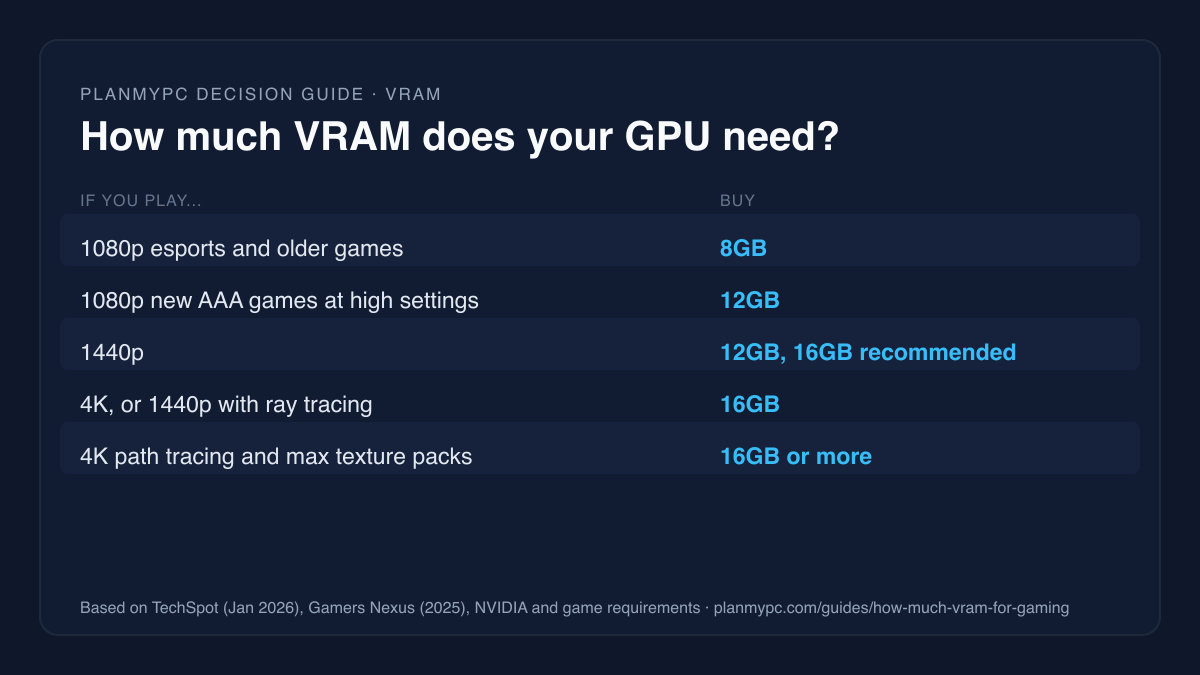
How much VRAM for your resolution
| Your target | VRAM to buy | Next step |
|---|---|---|
| 1080p esports and older games | 8GB is enough | Best GPU for Valorant |
| 1080p in new AAA games at high settings | 12GB or more | GPU benchmarks |
| 1440p | 12GB minimum, 16GB recommended | Best GPUs for 1440p |
| 4K, or ray tracing at 1440p | 16GB | Best GPUs for 4K |
| 4K path tracing, maxed texture packs | 16GB minimum; only the RTX 5090 has more among current-generation cards | Indiana Jones GPU guide |
Memory size is a floor, not a speed. A card needs enough VRAM for the resolution and settings you want, and then its GPU decides how fast it runs. More memory does not make a slow chip fast.
Who needs 16GB, and who can live with 8GB
Buy 16GB if you:
- game at 1440p or 4K, or want ray tracing on;
- keep a graphics card for four or more years;
- play big new releases at launch, often with high-resolution texture settings;
- choose between the 8GB and 16GB versions of the same card.
8GB can still work if you:
- play esports titles such as Valorant, Counter-Strike 2 or Fortnite at 1080p (see the competitive esports build);
- are happy to lower texture quality in new AAA games (see what to change on an 8GB card);
- are buying a stop-gap card for an older PC (the upgrade planner compares options against your current parts).
Same chip, 8GB vs 16GB: what reviewers found
The cleanest evidence comes from cards sold in two memory sizes. The GeForce RTX 5060 Ti and the Radeon RX 9060 XT each come in 8GB and 16GB versions with the same GPU chip and the same 128-bit memory bus, so memory capacity is the main difference between the versions.
PC Gamer's March 2026 test ran both pairs on the same system. In Cyberpunk 2077 at 1080p, with Ultra ray tracing and Quality upscaling:
| Card | Average FPS | 1% low FPS |
|---|---|---|
| GeForce RTX 5060 Ti 16GB | 84 | 56 |
| GeForce RTX 5060 Ti 8GB | 78 | 42 |
| Radeon RX 9060 XT 16GB | 86 | 68 |
| Radeon RX 9060 XT 8GB | 68 | 36 |
The RTX 5060 Ti pair is close on average FPS and the RX 9060 XT pair is not, but on 1% lows both 8GB cards fall far behind. At 1440p, the RX 9060 XT 8GB's 1% lows dropped to 19 FPS.
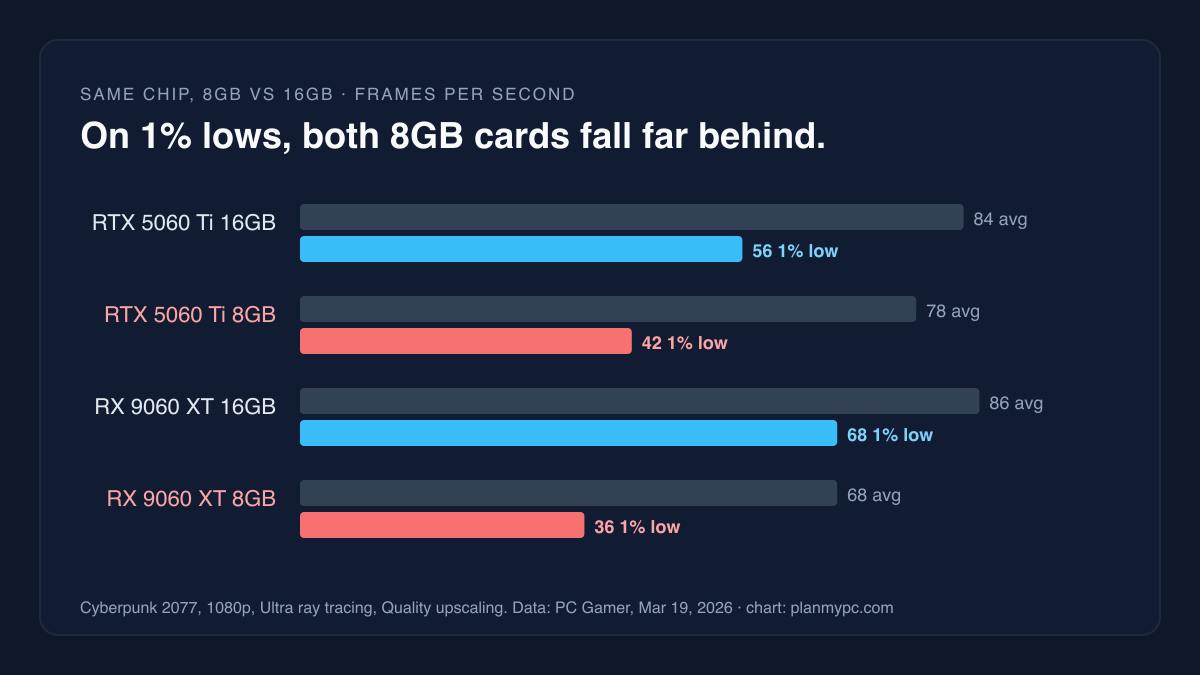
PC Gamer's measured results from the table above, charted by PlanMyPC. Data: PC Gamer, Mar 19, 2026. Other reviewers found the same pattern:
- Spider-Man 2: TechSpot found the 16GB RX 9060 XT delivered 35% higher average frame rates and 70% better 1% lows than the 8GB version, both with 16GB of system memory.
- Cyberpunk 2077: Phantom Liberty, 1080p with medium ray tracing: a different comparison with the same symptom. Gamers Nexus measured the 8GB RTX 5060 at 51 FPS on average, but its 0.1% lows fell to 21 FPS, which is what stutter looks like in a chart. At 4K, the 8GB cards it ran (the RTX 3070, 3070 Ti and 5060) were "so variable" from exceeding VRAM that their numbers were meaningless.
- Gamers Nexus concluded that an 8GB card should not exist at the price these cards sell for today.
AMD's launch announcement describes the RX 9060 XT as designed for smooth gaming at 1440p. Those reviews are why we treat the 16GB version as the 1440p card and the 8GB version as a 1080p card.
Two more findings from PC Gamer's test matter if an 8GB card is all your budget allows:
- Not all 8GB cards behave the same. In its games, the AMD cards tended to use more VRAM than the NVIDIA ones, and the RX 9060 XT 8GB suffered more for it; the RTX 5060 Ti 8GB often held up better.
- Lower settings help a lot. PC Gamer found that dropping to Medium or High settings "works wonders" for the 8GB cards, and concluded that 8GB is still enough if you accept that trade.
Why running out of VRAM shows up as stutter
When a game needs more video memory than the card has, it does not simply run slower. Textures and other data that should sit in VRAM get pushed into system memory and fetched over the PCIe bus, which is far slower. TechSpot saw system memory read bandwidth rise by roughly 70% when an 8GB card ran out of VRAM in Marvel Rivals (TechSpot).
The symptoms:
- the 1% and 0.1% lows collapse, sometimes while the average still looks fine;
- the game hitches when you turn quickly or enter a new area;
- textures stay blurry or swap to low-resolution versions.
Some games crash instead. Indiana Jones and the Great Circle is the clearest case: Notebookcheck found it crashing on RTX 40-series GPUs with too little memory at its Very Ultra preset, in a review focused on laptop GPUs, and only stopped seeing crashes at 16GB.
What games ask for
Publishers' own requirements show where the floor is moving. These are the games whose Steam requirement lists state a VRAM figure:
| Game | Minimum | Recommended |
|---|---|---|
| Indiana Jones and the Great Circle | 8GB (Low, 1080p, ray tracing required) | 12GB (High, 1440p) |
| DOOM: The Dark Ages | 8GB (Low, 1080p, ray tracing required) | 10GB (High, 1440p) |
| Borderlands 4 | 8GB required | Not stated |
| Monster Hunter Wilds | 6GB (Lowest, 1080p upscaled from 720p, 30 FPS) | 8GB (Medium, 1080p, 60 FPS with frame generation) |
The pattern is consistent: 8GB is where most of these games start, at 1080p and low settings, and the recommended line for High at 1440p asks for 10GB to 12GB. Read the conditions next to the number. An 8GB card in a "recommended" line can come with a low resolution, a medium preset or frame generation attached, as it does for Monster Hunter Wilds.
What uses VRAM, and why overlays overstate it
NVIDIA's own explainer lists the main drivers (NVIDIA):
- Resolution: higher resolutions generally need more VRAM.
- Ray tracing: it "requires additional VRAM".
- Texture packs: a game "may launch with an optional extra large texture pack and allocate more VRAM".
NVIDIA also warns that games "will often request more memory if it's available". So a monitoring overlay showing 11GB in use on a 16GB card does not mean the game needs 11GB; it may be reserving spare memory. The reliable sign of running out is the behavior above: stutter, poor lows and texture swapping.
Current graphics cards by memory size
| Graphics card | VRAM | Memory bus |
|---|---|---|
| GeForce RTX 5060 | 8GB GDDR7 | 128-bit |
| GeForce RTX 5060 Ti | 8GB or 16GB GDDR7 | 128-bit |
| Radeon RX 9060 XT | 8GB or 16GB GDDR6 | 128-bit |
| Intel Arc B580 | 12GB GDDR6 | 192-bit |
| GeForce RTX 5070 | 12GB GDDR7 | 192-bit |
| Radeon RX 9070 | 16GB GDDR6 | 256-bit |
| Radeon RX 9070 XT | 16GB GDDR6 | 256-bit |
| GeForce RTX 5070 Ti | 16GB GDDR7 | 256-bit |
| GeForce RTX 5080 | 16GB GDDR7 | 256-bit |
| GeForce RTX 5090 | 32GB GDDR7 | 512-bit |
From NVIDIA's comparison page, AMD's RX 9070 and RX 9070 XT pages and Intel's Arc B580 specifications.
The table makes the mid-range choice clear. Indiana Jones recommends a 12GB card for High settings at 1440p, so the RTX 5070's 12GB is enough for 1440p today, and it is the card's main trade-off against the 16GB RX 9070 and RX 9070 XT. RTX 5070 vs RX 9070 XT covers that pair in full.
What to change if you have an 8GB card
For 1080p esports and older games, 8GB is enough. For new AAA games it works with compromises, so change these first:
- Texture quality: drop it one step first. NVIDIA lists texture packs among the main drivers of VRAM use, and PC Gamer found that lowering settings "works wonders" on 8GB cards.
- Ray tracing: turn it off, since NVIDIA notes it "requires additional VRAM".
- Render resolution: use the upscaler's Quality or Balanced mode. A lower internal resolution needs less memory, by the same logic as NVIDIA's note that higher resolutions need more.
- System RAM: make sure you have 32GB, so the overflow does not reach the page file (next section).
The 8GB versions of current cards cost less for a reason, and the reviews above show where that saving goes.
Can more system RAM make up for low VRAM?
Partly. With an 8GB card, the overflow lands in system memory, so having plenty of it helps. TechSpot found the 8GB RX 9060 XT's 1% lows in Spider-Man 2 improved by more than 60% with 32GB of system RAM instead of 16GB, though the 16GB card was still smoother (TechSpot). If you already own an 8GB card, the fixes are lowering texture quality, which costs nothing, and making sure you have 32GB of RAM. Our RAM guide covers that choice.
Worked example: put the memory decision into a build
- Open the example 1440p build in the planner. It uses a 16GB Radeon RX 9070.
- Swap the card for a 12GB or 8GB model and compare the totals. The planner's FPS estimates are per GPU chip and do not model memory size, so an 8GB and a 16GB version of the same card show the same estimate. Use the reviews above for the memory decision.
- Check the game you care about most on its GPU page, such as Monster Hunter Wilds or Indiana Jones and the Great Circle, for estimated FPS by card and resolution.
- A bigger card may change your power supply: see what size power supply you need.
Sources
- TechSpot, "How Much RAM Do Gamers Need? 8GB vs. 16GB vs. 32GB vs. 64GB", Steven Walton, Jan 8, 2026: RX 9060 XT 8GB vs 16GB in Spider-Man 2, VRAM spill-over into system memory. Accessed Oct 27, 2026.
- PC Gamer, "My real-world testing shows 8 GB GPUs are still enough for gaming in 2026", Andy Edser, Mar 19, 2026: RTX 5060 Ti and RX 9060 XT, 8GB vs 16GB, five games. Accessed Oct 27, 2026.
- Gamers Nexus, Radeon RX 9060 XT 16GB review, Jun 4, 2025 (article Jul 24, 2025): 8GB results in Cyberpunk 2077, verdict on 8GB cards. Accessed Oct 27, 2026.
- Notebookcheck, Indiana Jones and the Great Circle performance review, Jan 14, 2025 (updated Oct 5, 2026): crashes with too little VRAM. Accessed Oct 27, 2026.
- Steam store requirements for Indiana Jones and the Great Circle, DOOM: The Dark Ages, Borderlands 4 and Monster Hunter Wilds. Accessed Oct 27, 2026.
- NVIDIA, "A Deeper Look At VRAM On GeForce RTX 40 Series Graphics Cards", May 18, 2023: what drives VRAM use, allocation vs use. Accessed Oct 27, 2026.
- Memory specifications: NVIDIA GeForce comparison, AMD Computex 2025 release (RX 9060 XT), AMD RX 9070 and RX 9070 XT pages, Intel Arc B580 specifications. Accessed Oct 27, 2026.