Most gaming PCs need a 650W to 850W power supply (PSU). Start from your graphics card maker's recommended system power, which already assumes a high-end CPU, then buy a quality ATX 3.x unit one common size above it. Plan on 1000W or more for an RTX 5080 or RTX 5090.
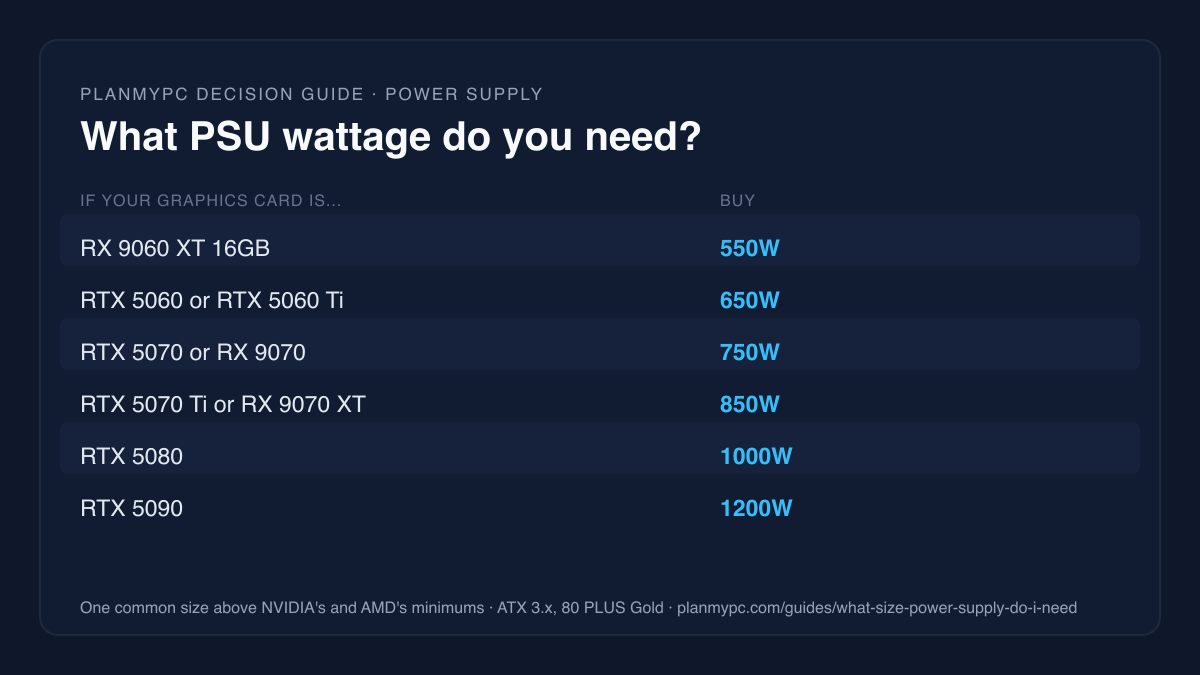
What PSU wattage does your graphics card need?
Take the card maker's recommended PSU and buy one common size above it: 650W for an RTX 5060 Ti, 850W for an RTX 5070 Ti or RX 9070 XT, 1000W for an RTX 5080. The graphics card is the biggest power draw in a gaming PC, so its maker's figure is the right starting point. NVIDIA calls the card's own draw Total Graphics Power and AMD calls it Typical Board Power. The "recommended" column is the maker's own minimum for the whole system. The last column is our pick: one common size above that (550, 650, 750, 850, 1000, 1200W), so the unit is not running near its limit.
| Graphics card | Card power | Maker's recommended PSU | Our pick |
|---|---|---|---|
| Radeon RX 9060 XT 16GB | 160W | 450W | 550W |
| GeForce RTX 5060 | 145W | 550W | 650W |
| GeForce RTX 5060 Ti | 180W | 600W | 650W |
| Radeon RX 9070 | 220W | 650W | 750W |
| GeForce RTX 5070 | 250W | 650W | 750W |
| GeForce RTX 5070 Ti | 300W | 750W | 850W |
| Radeon RX 9070 XT | 304W | 750W | 850W |
| GeForce RTX 5080 | 360W | 850W | 1000W |
| GeForce RTX 5090 | 575W | 1000W | 1200W |
NVIDIA's figures come from its GeForce comparison page, and AMD's from its product pages for the RX 9070 XT, RX 9070 and RX 9060 XT. NVIDIA's footnote matters: its minimum "is based on a PC configured with a Ryzen 9 9950X processor", a 16-core, 170W chip (AMD), which is more CPU than most gaming builds use. With a typical 6- or 8-core gaming CPU, the maker's number already includes some margin. Intel's high-end K-series chips are the exception, as the next section explains.
For an older card, such as an RTX 40 or RTX 30 series or a Radeon RX 7000 or 6000 series, use the same method with the figure on that card's spec page.
Who should buy bigger, and who can buy smaller
Step up one more size if you:
- plan to move to a faster graphics card during the power supply's life, which is often longer than the card's;
- run an Intel Core Ultra 7 or 9 K-series chip, which Intel rates at up to 250W of Maximum Turbo Power (Intel);
- overclock, or add several drives, fans and lighting controllers;
- want the fans to stay slow and quiet under load.
You can buy at the maker's figure if you:
- pair a 65W CPU such as the Ryzen 5 9600X with an RTX 5060-class or RX 9060 XT card, and will never change the card (browse units by wattage in the power supply catalogue);
- are on a tight budget and would rather spend on the graphics card, as long as the unit is a good one (see how to tell, below).
In a small-form-factor case, the limit is the unit's size, not its wattage: buy an SFX unit at the wattage in the table, and check which power supply sizes the case takes. The compact Mini-ITX build shows the trade-offs.
How to size a power supply yourself
- Find the graphics card's power figure on the maker's page (the table above covers the current cards).
- Find the CPU's maximum, not its base figure. Intel lists a Processor Base Power of 125W for the Core Ultra 7 265K and Core Ultra 9 285K but a Maximum Turbo Power of 250W (Intel). AMD lists a default TDP, 120W for the Ryzen 7 9800X3D.
- Add the rest of the system: motherboard, memory, drives and fans. NVIDIA's own numbers show how much room it leaves: subtract each card's power from its recommended system power and roughly 400W to 490W remains for the CPU (a 16-core Ryzen 9 9950X) and everything else. That is our arithmetic from NVIDIA's table.
- Aim for the estimated load to land between about half and two-thirds of the unit's rating. That leaves room for power spikes and upgrades, and it sits near where 80 PLUS efficiency peaks, at 50% load. With an 8-core Ryzen 7 9800X3D at its full-load power, as the planner counts it, our picks land in that range for every card except the RX 9060 XT, where 550W reaches about 72% by our arithmetic; buy 650W for that pairing.
The compatibility checker does a quick version of steps 1 to 3: paste a parts list and it adds the CPU's full-load power and the graphics card's rated power to a flat 75W for the rest of the system, then compares the total with your power supply. It warns only above 80% load, so a pass is a floor, not the target in step 4. It counts the CPU at its maximum, as step 2 advises: 250W for a Core Ultra 7 265K rather than its 125W base figure, and 162W for the Ryzen 7 9800X3D rather than its 120W TDP.
Why graphics cards need headroom: power spikes
A graphics card's draw is not flat. It jumps for tiny fractions of a second as the workload changes, and a power supply has to ride those spikes without its protection shutting the PC off.
That is what the ATX 3 standard changed. Intel's current design guide requires a power supply over 450W with a 12V-2x6 connector to handle excursions to 200% of its rated power for 100μs, 160% for 10ms and 120% for 100ms. Units without the connector, and units of 450W or less, have a lower bar: 150% for 100μs (Intel ATX 3 design guide). So an 850W ATX 3.x unit with the 16-pin cable is built to absorb brief spikes well above 850W. Older ATX 2.x units were not required to.
Partner cards can also draw a little more than the reference figure. In Gamers Nexus' review, a Sapphire RX 9070 XT drew about 310W to 311W in games (Gamers Nexus), against AMD's 304W typical board power.
The 16-pin connector: 12V-2x6, adapters and cables
NVIDIA lists two ways to power each card from the RTX 5070 up (NVIDIA):
| Card | Adapter in the box | Or one native cable |
|---|---|---|
| RTX 5070, RTX 5070 Ti | 2x 8-pin | 300W or greater |
| RTX 5080 | 3x 8-pin | 450W or greater |
| RTX 5090 | 4x 8-pin | 600W |
NVIDIA also recommends a "PCIe CEM 5.1 compliant PSU". The current version of the 16-pin connector is called 12V-2x6. Compared with the original 12VHPWR, its power pins are longer and its sense pins shorter, and a plug that is not fully seated now tells the card it may draw no power at all. Gamers Nexus describes those changes as intended to stop cards drawing power without being fully plugged in, and notes the spec now requires at least 25mm of straight wire past the plug (Gamers Nexus). In practice:
- prefer a power supply with a native 12V-2x6 cable for any card with a 16-pin socket;
- if you use the adapter, feed each of its 8-pin plugs from a separate cable, not one cable's daisy-chained pigtail;
- push the plug in until it clicks and sits flush, and don't bend the cable sharply at the connector;
- never reuse modular cables from a different power supply, even from the same brand: pin layouts differ, and the wrong cable can damage parts.
AMD's spec pages list two standard 8-pin connectors for the RX 9070 and one for the RX 9060 XT 16GB (AMD), but partner cards vary, so check the exact model. The planner treats GPU power connectors as a manual check for this reason: its catalogue does not hold connector data, so it cannot confirm a match.
How to tell a good power supply from a weak one
Wattage is only half the choice. What to look for:
- An ATX 3.x unit with a native 12V-2x6 cable, so it is built to ride brief spikes of up to 200% of its rating.
- Independent efficiency and noise grades. Cybenetics measures efficiency across the whole load range and publishes a separate LAMBDA noise grade, which tells you more about how a unit will sound than an 80 PLUS badge.
- 80 PLUS Gold or better as a floor (table below).
- A long warranty and a clear list of protections on the spec sheet (over-current, over-voltage, short-circuit and over-temperature).
Does 80 PLUS Gold matter?
Yes, as a floor: Gold is the sensible target, and higher tiers rarely change heat or noise in a gaming PC. 80 PLUS ratings describe efficiency: how much of the power drawn from the wall reaches your parts, with the rest turned into heat. These are the requirements for a standard 115V internal unit (CLEAResult's 80 PLUS ratings page):
| Rating | 20% load | 50% load | 100% load |
|---|---|---|---|
| 80 PLUS Bronze | 82% | 85% | 82% |
| 80 PLUS Gold | 87% | 90% | 87% |
| 80 PLUS Platinum | 90% | 92% | 89% |
| 80 PLUS Titanium | 92% | 94% | 90% |
Gold is a few points more efficient than Bronze, so a little less heat and fan noise; Platinum and Titanium add about two points each at 50% load. The badge says nothing about noise, ripple or spike handling, which is why Cybenetics' noise and efficiency grades are worth checking too.
Does a bigger power supply use more electricity?
Not by an amount you would notice. A power supply delivers what your parts ask for; an 850W unit does not draw 850W. A unit far larger than you need spends its time at light load, where efficiency is lower (of the four tiers in the table, only Titanium sets a 10% load requirement). So a 1600W unit for a 400W build costs more and runs a little less efficiently, while an 850W unit for a build that draws about half that sits near the efficiency peak.
Worked example: check the power budget of a real build
- Open this example 1440p build in the planner: a Ryzen 7 9800X3D, a Radeon RX 9070 and an 850W ATX power supply.
- Read the power panel. On Nov 5, 2026 it estimated about 457W against the 850W unit, 54% load: the CPU's 162W full-load power plus the card's rated 220W plus 75W for everything else. That is machine-checked from rated figures, not a wall-meter reading.
- Swap in a 750W unit and the load rises to 61%, still above AMD's 650W recommendation for the RX 9070 and inside the range in step 4.
- Swap the card for an RTX 5070 Ti-class card instead, and NVIDIA's own minimum rises to 750W, which is why we would keep the 850W unit.
- Building with a Core Ultra 7 265K instead? The planner counts it at its 250W maximum turbo power, so with the same graphics card the estimate rises to about 545W, 64% of the 850W unit and still inside the range in step 4.
- Check the "needs verification" list: GPU power connectors are one of the checks you do by hand, against the card's and the power supply's spec pages.
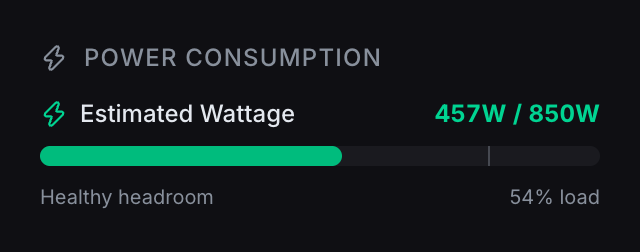
The planner's power estimate for the example build on Nov 5, 2026, calculated from the parts' rated figures.
For the other compatibility checks, from CPU socket to case clearance, see will these PC parts work together. If you are still choosing the card itself, RTX 5070 vs RX 9070 XT and the best GPUs for 4K cover the cards that drive these numbers.
Sources
- NVIDIA GeForce graphics card comparison: Total Graphics Power, Required System Power, connector options and the Ryzen 9 9950X footnote for RTX 50 cards. Accessed Oct 27, 2026.
- AMD product pages for the Radeon RX 9070 XT, RX 9070 and RX 9060 XT: Typical Board Power, minimum PSU, connectors. Accessed Oct 27, 2026.
- AMD Ryzen 7 9800X3D and Ryzen 9 9950X specifications: core count, default TDP. Accessed Oct 27, 2026.
- Intel Core Ultra desktop processors (Series 2) product brief: base and maximum turbo power. Accessed Oct 27, 2026.
- Intel, ATX Version 3 Multi Rail Desktop Platform Power Supply Design Guide, Rev 2.1a, "PSU Power Excursion": the power-excursion table. Accessed Oct 27, 2026.
- Gamers Nexus, "12VHPWR is a Dumpster Fire", Oct 7, 2024 (updated Mar 24, 2025): 12V-2x6 changes. Accessed Oct 27, 2026.
- Gamers Nexus, Radeon RX 9070 XT review, Mar 6, 2025: measured card power. Accessed Oct 27, 2026.
- CLEAResult, 80 PLUS ratings explained and Cybenetics FAQ: efficiency requirements and what Cybenetics measures. Accessed Oct 27, 2026.