For a new gaming PC in 2026, buy 32GB of RAM as two 16GB sticks. Most games still run on 16GB, but five of seven big 2024-25 releases list 32GB as recommended on Steam, and an 8GB graphics card can spill game data into system memory. Buy 64GB only for local AI models, heavy video work or large mod lists.
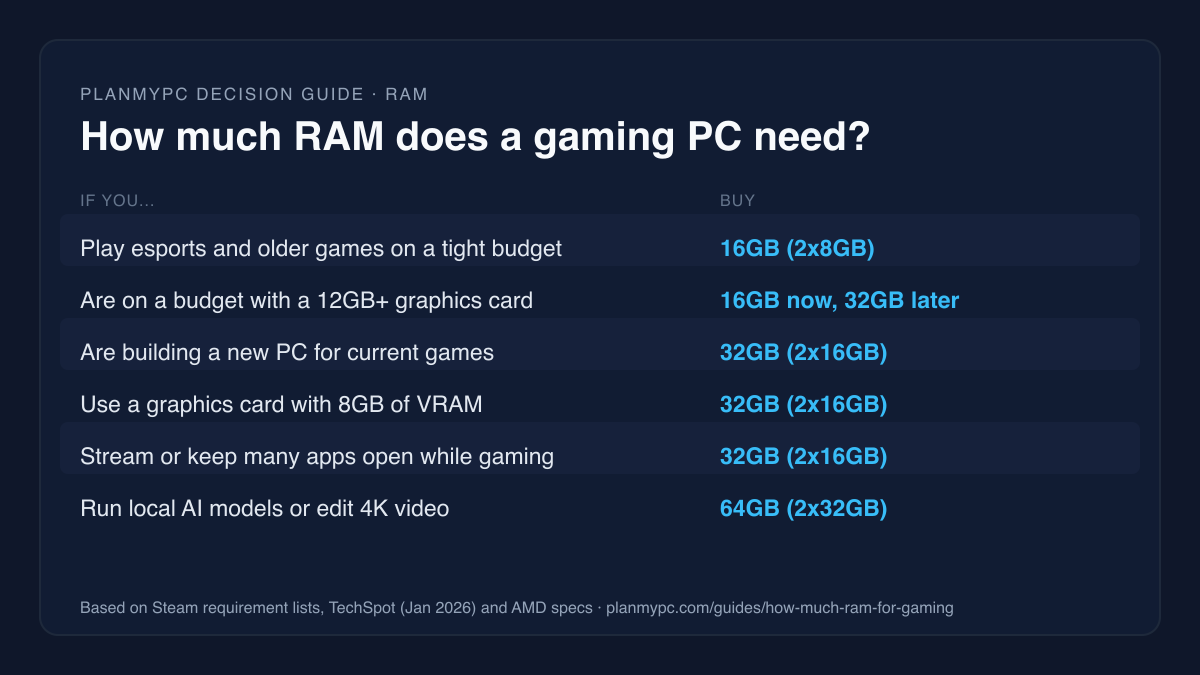
The short answer for your build
| Your situation | RAM to buy | Next step |
|---|---|---|
| Esports and older games only, on a tight budget | 16GB (2x8GB) | Budget build ideas |
| A budget AAA build with a 12GB+ graphics card | 16GB now, if it buys a better card | GPUs for 1440p |
| A new gaming PC for current AAA games | 32GB (2x16GB) | Load an example build |
| A graphics card with 8GB of VRAM | 32GB (2x16GB) | Why 8GB cards need more RAM |
| Gaming plus streaming, Discord and a browser full of tabs | 32GB (2x16GB) | Streaming builds |
| Local AI models, 4K editing, huge mod packs | 64GB (2x32GB) | Local LLM build |
Capacity is only half the decision. The other half is how many sticks and whether they match your platform, which is covered further down.
Who should buy 32GB, and who can stay at 16GB
Buy 32GB if you:
- are building a new PC to play this year's big releases at 1440p or 4K;
- are pairing it with an 8GB graphics card (the RAM covers for the card when its memory fills up);
- use the processor's integrated graphics, which borrow their video memory from system RAM;
- stream, record, or keep a browser, Discord and a launcher open while you play;
- plan to keep the PC for four or more years without opening it up again.
You can stay at 16GB if you:
- mostly play esports titles such as Valorant, Counter-Strike 2 or Fortnite (see the competitive esports build);
- have a graphics card with 12GB of VRAM or more and play one game at a time (the best GPUs for 1440p page lists each card's memory);
- need the savings for a better graphics card right now, and accept replacing the kit with a 2x16GB pair later rather than adding a second pair (see Two sticks, not four).
What current games ask for
Publishers' own minimum and recommended specs are the most direct evidence. Here is what the Steam store lists for seven big releases from late 2024 to late 2025:
| Game | Minimum RAM | Recommended RAM |
|---|---|---|
| Microsoft Flight Simulator 2024 | 16GB | 32GB |
| Indiana Jones and the Great Circle | 16GB | 32GB |
| Kingdom Come: Deliverance II | 16GB | 32GB |
| DOOM: The Dark Ages | 16GB | 32GB |
| Borderlands 4 | 16GB | 32GB |
| Monster Hunter Wilds | 16GB | 16GB |
| Battlefield 6 | 16GB | 16GB |
Every one of them names 16GB as the floor, and five of the seven recommend 32GB. Treat that 32GB line as headroom rather than a hard requirement: in TechSpot's testing below, 16GB was enough even in Borderlands 4, DOOM: The Dark Ages and Kingdom Come: Deliverance II, which all recommend 32GB.
PC owners have already moved. In Valve's Steam Hardware Survey for September 2026, 32GB (42.2% of systems) overtook 16GB (37.8%) as the most common amount, and only 6.5% of systems still had 8GB.
Does 32GB of RAM give you more FPS than 16GB?
Usually not in average frame rate. Running out of RAM rarely lowers your FPS evenly. It shows up as stutter: the 1% lows fall, frame times spike, and textures load late.
The most useful recent test is TechSpot's January 2026 RAM capacity study. It used one 64GB kit and limited what Windows could address, so speed and timings stayed identical across 8GB, 16GB and 32GB. Chrome and Discord stayed open in the background. It ran a Ryzen 7 9800X3D and a GeForce RTX 5090 at 4K with maximum settings, so the graphics card never ran short of its own memory; the next section shows what changes when it does. Its findings:
- 16GB was enough in most of the games it ran, including Battlefield 6, Marvel Rivals, Borderlands 4, Cyberpunk 2077: Phantom Liberty, DOOM: The Dark Ages and Kingdom Come: Deliverance II.
- Mafia: The Old Country was the exception: TechSpot called it the first game where 16GB "isn't quite enough", needing about 20GB for smooth frame times.
- 8GB gave stutter or broken textures in nearly every game.
- TechSpot's conclusion: 32GB is "the sweet spot for gamers".
So 16GB works for most games today. 32GB is the amount that does not make you check each new release.
Your graphics card changes the answer
When a game needs more video memory than your graphics card has, the extra data does not vanish. It moves into system RAM, and from there to the much slower page file on your SSD if RAM fills up too.
TechSpot measured this with an 8GB Radeon RX 9060 XT in Marvel Rivals. With only 16GB of system memory, data spilled to the page file and frame times became "terrible". Moving to 32GB made the stutter far less severe. In Spider-Man 2, the 8GB card's 1% lows improved by more than 60% with 32GB of system RAM instead of 16GB (TechSpot).
If your card has 8GB, treat 32GB of RAM as part of the price of that card. TechSpot's results, side by side:
| Graphics card in TechSpot's test | What 16GB vs 32GB of system RAM changed |
|---|---|
| RX 9060 XT 8GB | 32GB cut the stutter sharply; 16GB spilled to the page file |
| RX 9060 XT 16GB | Little difference between 16GB and 32GB |
| RTX 5090 (32GB) | 16GB was enough in all but one game |
Two sticks, not four: how to buy the right kit
Desktop Ryzen and Intel Core chips have two memory channels. Two matched sticks fill both, which is why "2x16GB" is the standard 32GB kit.
Four sticks of DDR5 cost you speed. AMD's Ryzen 7 9800X3D spec page rates the chip for DDR5-5600 with two sticks but only DDR5-3600 with four. So:
- Buy the capacity you want in one two-stick kit. 2x16GB beats 4x8GB.
- Planning for 64GB later? Buy 2x32GB now, rather than adding a second pair to a 2x16GB kit.
- Match the memory type to the board. AM5 and Intel Core Ultra (LGA1851) boards take DDR5 only, AM4 boards take DDR4 only, and some older Intel boards take DDR4, so check the board's spec. The compatibility guide covers the other checks, and the compatibility checker flags a mismatch automatically.
- Check the board's memory support list (QVL) for your exact kit if you can; it lists the kits the board maker has validated at their rated speed.
- Turn on the memory profile (EXPO on AMD, XMP on Intel) in the BIOS, or the kit runs below its rated speed. Faster kits, such as the example build's DDR5-6000 kit, reach their rated speed only through that profile. Whether a faster kit is worth paying for is its own question, covered in DDR5-8000 in 2026.
Is 64GB worth it for gaming?
Not for games alone. The most demanding game in TechSpot's test, Mafia: The Old Country, needed about 20GB, and none of the seven requirement lists above asks for more than 32GB.
64GB earns its place when the PC does other work:
- Local AI models load into memory, and larger models need far more than 32GB. The local LLM build guide is sized for this.
- Video editing with long 4K timelines, effects and caches, as in the content creator workstation.
- Heavy simulation and modding, such as large Flight Simulator add-on libraries or modded open-world games.
Is 8GB of RAM still enough in 2026?
For gaming, no. Windows 11 itself needs 4GB as a minimum, and every game in the requirement table asks for at least 16GB. TechSpot found 8GB stuttered or broke textures in nearly every title it ran. An 8GB system is for light office work, not games. Only 6.5% of systems in Valve's September 2026 survey still had 8GB, and integrated graphics borrow part of that memory for video.
RAM prices: is 16GB the smart way to save right now?
Memory prices are still climbing. TrendForce's September 30, 2026 outlook expects DRAM contract prices to keep rising in the fourth quarter of 2026, though more slowly, because suppliers are prioritizing high-performance server products, driven by AI demand.
That makes 16GB a defensible choice on a tight budget: an esports build, or an AAA build with a graphics card that has 12GB of VRAM or more, where the money saved buys a stronger card. TechSpot reached a similar conclusion: for budget-focused builders, 16GB "remains a perfectly viable option" while prices stay high. Everyone else should buy 32GB once, as a single kit, rather than paying for memory twice. Compare current kits, with each store's price and the time it was checked, on the best RAM for gaming page.
Worked example: check RAM in your own build
Start from a complete list rather than a single part:
- Open the example 1440p build in the planner: a Ryzen 7 9800X3D, a B850 board, a 32GB (2x16GB) DDR5-6000 kit, a 2TB NVMe drive, a 16GB Radeon RX 9070 and an 850W power supply. Each line shows its store price and when it was checked, and the total adds them up.
- Compare the memory line with the CPU line. If the memory costs about as much as the CPU, 32GB may be costing you a graphics-card tier, and that is the case where 16GB plus a better card makes sense.
- Swap the kit for a 2x8GB or 2x32GB kit and watch how much of the total it moves.
- Read the compatibility panel. For this list it confirmed that 32GB is within the board's maximum, that two modules fit its four slots, and that both the kit and the board are DDR5. The compatibility checker runs the same checks on any list you paste.
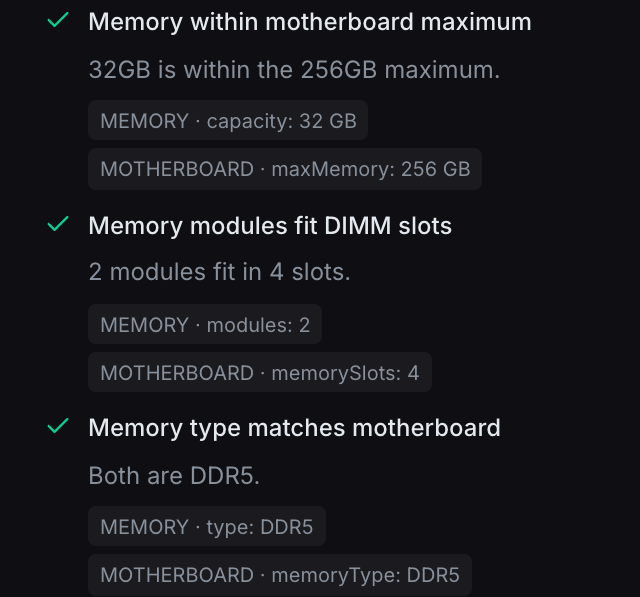
The planner's memory checks for the example build on Oct 27, 2026. They are machine checks against the catalogue's specs for these parts, not a physical test.
Sources
- Steam store system requirements for Microsoft Flight Simulator 2024, Indiana Jones and the Great Circle, Kingdom Come: Deliverance II, DOOM: The Dark Ages, Borderlands 4, Monster Hunter Wilds and Battlefield 6 (minimum and recommended RAM). Linked in the table; accessed Oct 27, 2026.
- TechSpot, "How Much RAM Do Gamers Need? 8GB vs. 16GB vs. 32GB vs. 64GB", Steven Walton, Jan 8, 2026 (capacity testing, test system, 8GB-VRAM spill-over). Accessed Oct 27, 2026.
- Steam Hardware & Software Survey, September 2026, Valve (installed RAM shares). Accessed Oct 27, 2026.
- AMD Ryzen 7 9800X3D specifications, AMD (memory speed with two and four DIMMs). Accessed Oct 27, 2026.
- Windows 11 specifications, Microsoft (minimum memory). Accessed Oct 27, 2026.
- TrendForce, 4Q26 memory contract price outlook, Sep 30, 2026 (DRAM price direction). Accessed Oct 27, 2026.